


All asset transformations
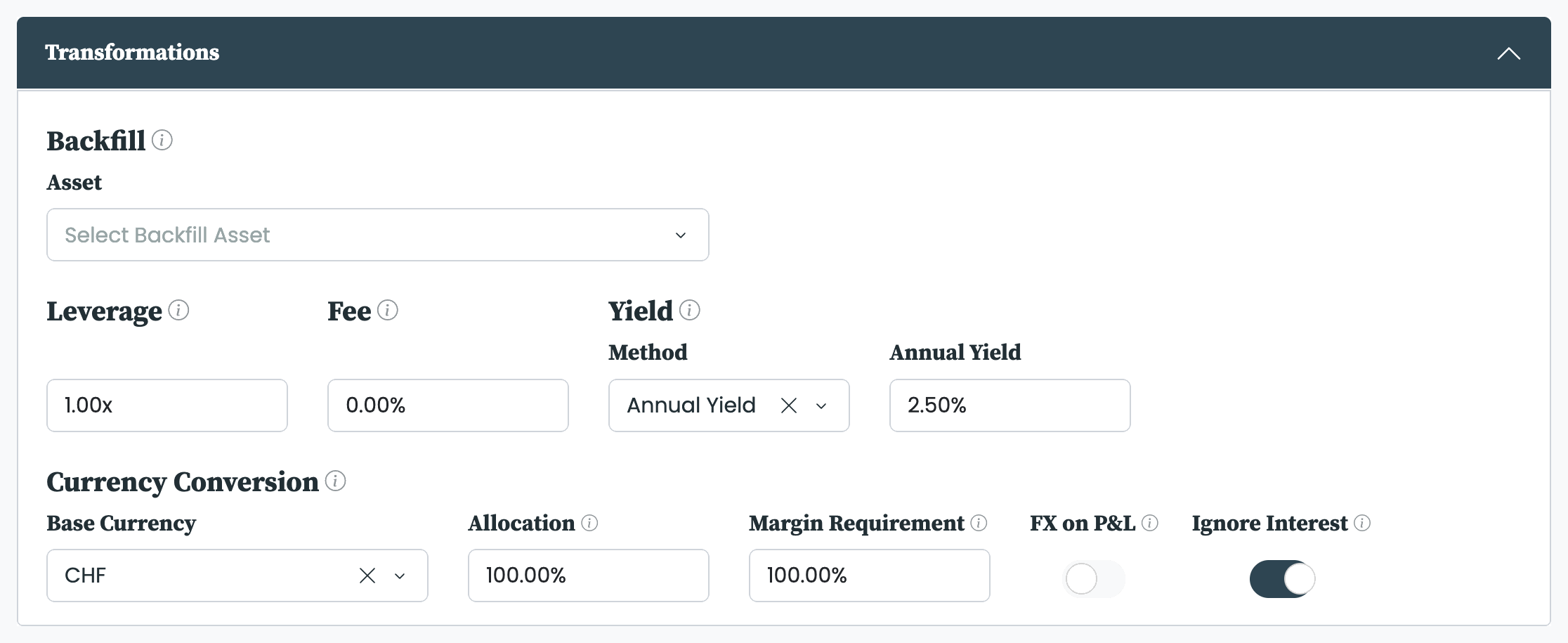
The five transformations in the Asset Builder.
The Asset Builder applies five transformations to any existing asset, producing a new asset that leaves the original untouched. Each one is optional, each can be combined with the others, and each adds a suffix to the new asset's ticker so the result is self-describing. Transformations are part of the Asset Builder add-on.
The five transformations, their effect, the controls that govern them, and the suffix each adds to the new ticker:
| Transformation | Effect | Key controls | Ticker suffix |
|---|---|---|---|
| Backfill | Extends history backwards using a second asset | Asset, Calculation, End Date | _e |
| Leverage | Multiplies daily returns by a factor from −5x to 5x | Factor | _2x, _3x, etc.; fractional adds _l; negative adds _s |
| Fee | Applies an annual cost drag of 0% to 100% | Fee | _f |
| Yield | Sets the asset's income return | Method (Annual Yield or Nowcast) | _y |
| Currency Conversion | Re-expresses the asset in another currency | Base Currency, Allocation, Margin Requirement, FX on P&L, interest controls | _ |
Backfill
Backfill extends an asset's history backwards using a second asset, so a short live record can be studied over a longer period. The S&P 500 tracking ETF launched in 2000, for example, but the index itself runs back to 1927; backfilling the ETF with the index gives a series long enough to backtest across earlier cycles.
Three controls govern it:
- Asset: the backfill asset whose earlier data fills the gap.
- Calculation: how the two are joined. Linear Regression uses the overlap period to regress one on the other, converts the backfill asset with the regression parameters, and stitches the converted series before the original. Stitch joins the backfill asset's data directly, with no adjustment.
- End Date: the last day of data used in the regression. Leaving it blank uses all available data; setting a date fixes the backfilled segment so it does not change as new prices arrive.
A backfilled asset takes the suffix _e.
Leverage multiplies the asset's daily returns by a factor between −5x and 5x. At 2.0x the daily returns are doubled; at −1.0x they are inverted, simulating a short position. Integer multiples take a suffix such as _2x or _3x; a fractional multiple, such as 1.5x, takes _l; and any negative factor adds _s.
Fee applies an annual cost drag of 0% to 100%, scaling the series so it reflects fee-inclusive performance. An asset with a 10% annual mean return and a 1% fee shows a 9% annual mean return after the fee. The fee scales both the Close and Adj Close series, so it shows up in the price and total-return series alike. A fee-adjusted asset takes the suffix _f.
Yield sets the asset's income return—the gap between its total return (the Adj Close series) and its price-only return ( the Close series); see Processing asset data. The Close series is left unchanged; the yield is added to it to form the Adj Close series, so a 1% annual yield makes the Adj Close compound about 1% a year faster than the Close. Method chooses how the yield is set: Annual Yield applies a fixed annual figure you enter; Nowcast measures the asset's recent realised yield—how far the Adj Close has outpaced the Close over the last number of weekdays you specify—and carries that across the whole series. A yield-adjusted asset takes the suffix _y.
Currency Conversion re-expresses an asset for an investor whose base currency differs from the asset's, so the series reflects what that investor would actually experience: the asset's local return, the currency move on top, and the cost of funding the position. The defaults model an ordinary cash purchase converted at the spot rate, so for a typical stock or ETF you can leave them unchanged; the other settings exist for a hedged view, full FX exposure, or futures-style funding.
- Base Currency: the currency to convert into—normally your own base currency.
- Allocation: how the position is funded, from 0% to 100%. At 100% (the default for stocks and ETFs) you convert cash from your base currency into the asset's currency and carry the full currency move—full FX exposure. At 0% you instead borrow the asset's currency and keep your cash in your base currency, hedging the currency move away so you see the asset's local return.
- Margin Requirement: the share of the position you post as cash—100% for a fully funded stock or ETF (the default), and typically 5% to 15% for a futures position.
- FX on P&L: Off (the default for cash instruments) converts the asset's full price at the current FX rate, the standard spot conversion. On converts only the daily profit and loss and leaves the price level unconverted—the futures-style treatment, and the default for futures.
- Ignore Interest: On (the default) earns and pays no interest. Switch it off to earn interest on the cash you hold and pay it on the cash you borrow, benchmarked to the three-month interbank rate; this reveals the next two controls.
- Spread: widens that benchmark—at 1% you earn the benchmark minus 1% on held cash and pay the benchmark plus 1% on borrowed cash.
- Ignore Negative Interest: floors both sides at zero while the benchmark is negative, so held cash does not pay negative interest and borrowed cash does not earn it.
A converted asset takes its new currency code as the suffix, such as _USD. The same idea applied at the portfolio level—where the equivalent settings carry their own names—is covered in Currency and FX handling.
The five transformations stack in any combination on a single asset. They are always applied in a fixed order—backfill, then leverage, then fee, then yield, then currency conversion—and their suffixes chain in that same order. An asset that is backfilled, doubled, charged a fee, given a yield, and converted to US dollars reads _e_2x_f_y_USD after its base ticker. The full auto-ticker and extension scheme is set out in Our asset-building options.


