


Analysis and comparison advanced settings
The advanced settings for the asset analysis and comparison provide additional options to customise the metrics calculations to your needs.
These settings apply whenever you analyse or compare assets and portfolios on the Insights pages; see also analysing and comparing portfolios for how to read the results.
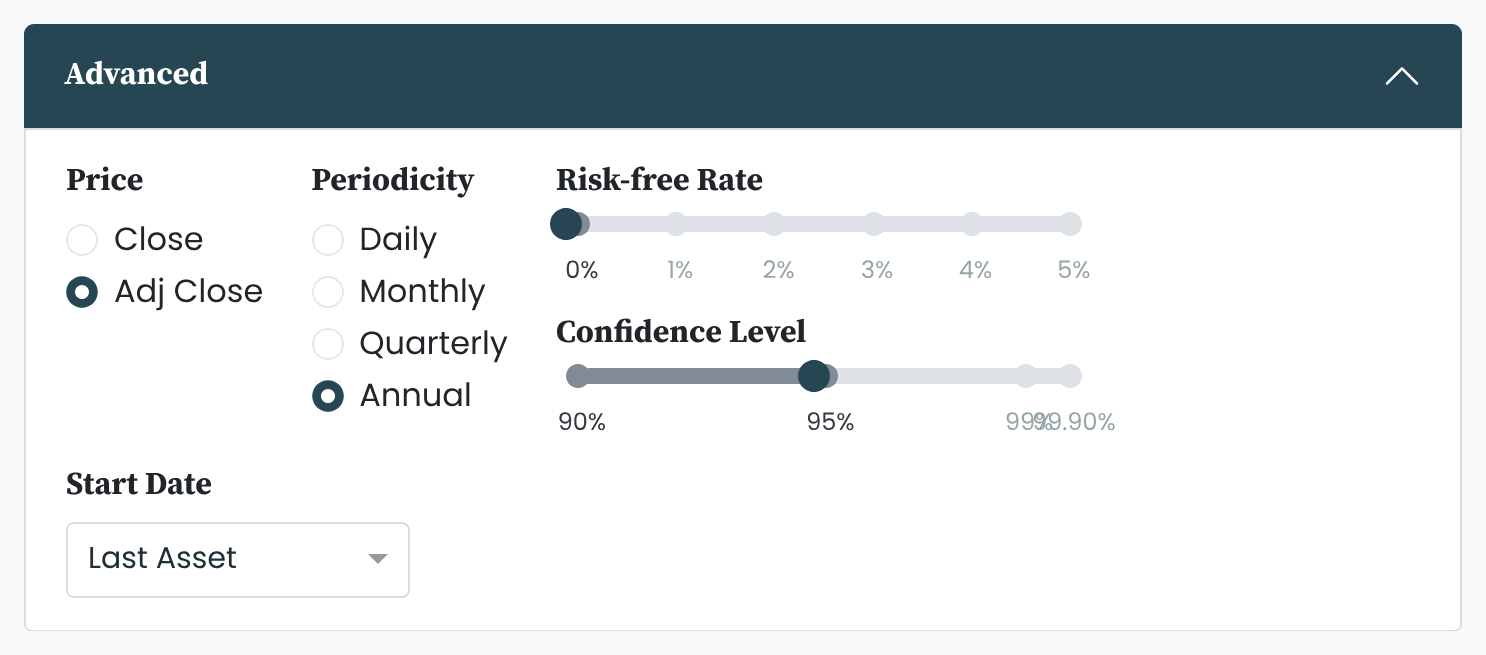
Advanced settings with default values
The values we have selected as the default values are the ones we believe to be the most sensible. You only ever have to worry about the advanced settings in case you would like to change the default values.
Gives the user the option to select which daily prices time series is used for the metrics calculations. To learn more about time series data, read this article.
- Close: the asset's daily price movements
- Adj Close: The asset's daily total return including any cash distributions, e.g. dividends and interest payments, and reinvestments of those
Default: Adj Close
The period to which relevant metrics are scaled.
- Daily: scaled to a period of one day
- Monthly: scaled to a period of one month; one month = 21 days
- Quarterly: scaled to a period of one quarter; one quarter = 3 month = 3 x 21 days = 63 days
- Annual: scaled to a period of one year, one year = 12 months = 12 x 21 days = 252 days
Default: Annual
Some metrics are independent of periodicity, e.g. cumulative return measures the return between the first and the last date in the data set. To learn more about the different metric types, read this article.
The (annualised) return that can (theoretically) be achieved with zero risk.
Typically, the yield on short-term US Treasuries is used as a proxy for the risk-free rate.
The risk-free rate is used for the metrics Sharpe ratio, Sortino ratio, and Alpha.
Default: 0%
The confidence level of the probability distribution of (daily) returns.
For example, at the 95% confidence level, value at risk marks the threshold that the worst 5% of daily returns fall below, and expected shortfall measures the average loss within that worst 5%. Assuming a normal distribution, this 95% threshold lies about 1.645 standard deviations below the mean.
The confidence level is used for the metrics value at risk and expected shortfall, both defined in the metrics we use.
Default: 95%
Defines the earliest possible start date (applies only to the asset comparison and not asset analysis).
- First Asset: the start date of the oldest asset in the selection
- Median Asset: the median start date in the selection
- Last Asset: the start date of the youngest asset in the selection
Default: Last Asset


